Rules
Set the files and folders AoTwin must never change, and see the guardrails that are always on.
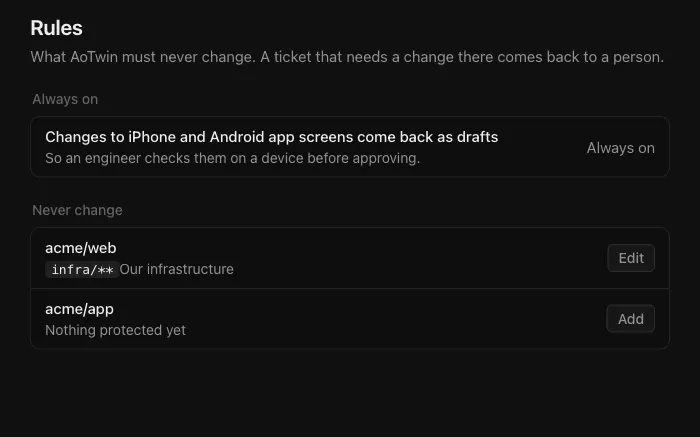
Overview
Rules say what AoTwin must never change. You set them for each repository: a folder of deployment files, your automation setup, anything an engineer should always handle personally.
If a ticket cannot be done without touching a protected path, AoTwin does not do it. The ticket comes back to a person with the reason.
Configure
Only admins can see and change rules. Members do not see Settings.
- Open Settings > Rules.
- Find the repository. If the list says Add a repository first, add one under Settings > Code and come back. See GitHub.
- Choose Add next to the repository. If it already has rules, choose Edit.
- Under Areas AoTwin must never change, write one folder or file pattern per line. Examples:
infra/**and.github/workflows/**. - Optionally write the reason under Why, in a few words. It can be up to 80 characters, and it is shown beside the paths.
- Choose Save.
A repository with no rules shows Nothing protected yet. Each pattern can be up to 200 characters.
What a rule does
- AoTwin is told which paths are off limits before it starts work in that repository.
- When it finishes, the finished change is checked against the rules again before anything is opened for review. A change that touches a protected path is not opened.
- The ticket then shows Handed back, and the person who asked is told.
A rule applies to the repository, not to a ticket. It covers every ticket AoTwin works on there.
Always on
Two guardrails are on for every workspace. You cannot switch them off.
- Changes to iPhone and Android app screens come back as drafts. An engineer checks them on a device before approving. You see this under Settings > Rules.
- Every change waits for an engineer on the team. AoTwin cannot approve, merge or release anything. You see this under Settings > General.
Other limits you control
Rules are one of three places where you decide how far AoTwin goes.
- Read-only repositories. In Settings > Code, clear AoTwin may change this repository and AoTwin only reads it. A ticket whose code lives there is handed back.
- Checks. Under Settings > Code, list the checks AoTwin must run before anything comes back for review, one per line as
name: command. A repository needs at least one. - Pausing. An admin can switch off Working on tickets under Settings > General. New tickets wait until it is switched back on.
FAQ
Who can change the rules?
Admins only. Members can see the effect, because tickets come back with the reason, but they cannot open Settings > Rules. See People.
Do rules apply to work that is already running?
Rules are read when AoTwin starts a ticket. A rule you save applies to tickets that start afterwards.
Does a rule stop an engineer from changing those files?
No. Rules limit AoTwin only. Your engineers work in the repository as usual.
What pattern syntax can I use?
One pattern per line. * matches any name inside one folder, and ** matches any number of folders. So infra/** covers everything under infra, and **/*.sql covers every .sql file. Write a folder as folder/**: a bare folder name matches only a file with that exact name.