What to hand over
Which tickets suit AoTwin, how to write them, and what happens when a ticket is unclear.
Overview
AoTwin does best with everyday tickets that have waited because nobody on the roadmap had a free hour: a copy fix, a missing filter, a layout that has been wrong for months. You write the ticket the way you would for a colleague. AoTwin reads it together with your code.
This page shows which tickets to hand over, how to write them, and what comes back when a ticket is unclear.
Tickets that suit AoTwin
- Copy changes. Wording on a button, an error message, an empty state, an email.
- Styling and layout fixes. A sidebar that covers the page on phones, buttons that wrap badly, spacing that has looked off for months.
- A new column or a filter. Data the screen already has, shown or narrowed in a new way.
- Simple create-and-edit screens. A form that saves a few fields and a list that shows them.
Here are three tickets AoTwin can take as written.
Change the contact form button to “Send message”
On the Contact page, the button under the form says “Submit”. Change it to “Send message”. The same wording should appear on the confirmation screen, where it says “Thanks for submitting”.
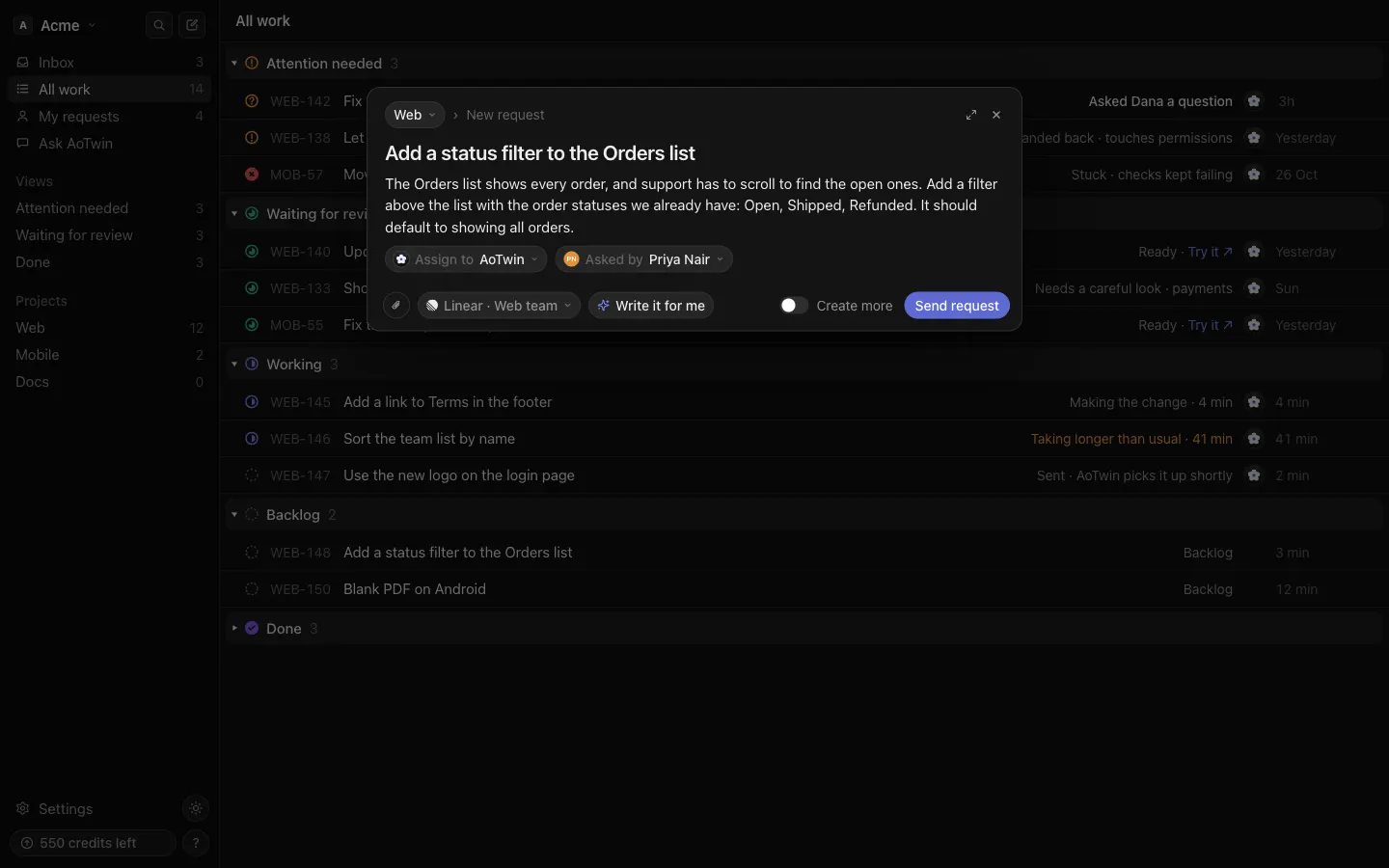
Add a status filter to the Orders list
The Orders list shows every order, and support has to scroll to find the open ones. Add a filter above the list with the order statuses we already have: Open, Shipped, Refunded. It should default to showing all orders. A screenshot of today’s list is attached.
Order summary overlaps the footer on tablets
Between 700 and 1000 pixels wide, the order summary on the Checkout page runs over the footer links. It has been like this since the redesign. The footer should always sit below the summary. A screenshot from an iPad is attached.
Each one says where the problem is, what should change, and what done looks like.
How to write the ticket
Give the ticket three things:
- Where. The page, screen or part of the product it is about.
- What should change. The result you want, in plain words. You do not need to describe the code.
- What done looks like. How you will know it is right.
Then:
- Attach a screenshot when the problem is visual. AoTwin reads it. You can attach one in New request, and in a comment on the ticket.
- Keep to one change per ticket. Each ticket comes back as one change for an engineer to review.
- Write a few sentences. A ticket with a very short description comes back at once with the reason that the description is too short to act on.
On a paid plan, Write it for me in New request tidies what you typed into a clear request. It uses only your words and adds nothing new. You can undo it.
What to keep for a person
AoTwin hands these back, or opens them with a warning, so an engineer decides:
- Infrastructure, database and dependency changes. Hosting setup, secrets, deploys, migrations, data backfills and package upgrades come back to a person.
- Sign-in, permissions and payments. AoTwin can make the change, but it opens as a draft with a warning at the top.
- iPhone and Android app screens. These always open as drafts, so an engineer checks them on a device.
- Anything that needs a business decision. If the right answer depends on context that is not in the ticket or the code, AoTwin asks or hands it back.
- Areas you have protected. Paths set under Rules always stay with a person.
When a ticket is unclear
Two things can happen.
AoTwin asks. If a detail is missing and guessing would be wrong, AoTwin asks one short question on the ticket. The ticket shows Waiting on you, the person who asked gets an email, and the question appears in their Inbox. Answer with a comment on the ticket, and AoTwin picks the work back up from your answer. It does not ask about anything the ticket or the code already answers.
AoTwin hands it back. If it cannot do the ticket well, it gives it back with the reason in one sentence: the description is too short, the change belongs to a part of the code it may not touch, or it could not find where the change lives. Add what is missing, then assign it again. See Assign a ticket to AoTwin.
FAQ
My copy ticket came back saying it changes dependencies or infrastructure. Why?
AoTwin leaves that kind of work to a person, and a ticket can read like it even when the change is only wording. Say what should change on the screen and try again, or let an engineer take it.
Can I put several changes in one ticket?
Write one ticket for each change. AoTwin makes one change per ticket, and a ticket that bundles several is harder to review.
How long does a ticket take?
Most changes take a few minutes. The ticket shows Working meanwhile. After about half an hour without news, it shows Taking longer than usual.