Statuses
What each status means, what moves a ticket from one to the next, and who can cancel.
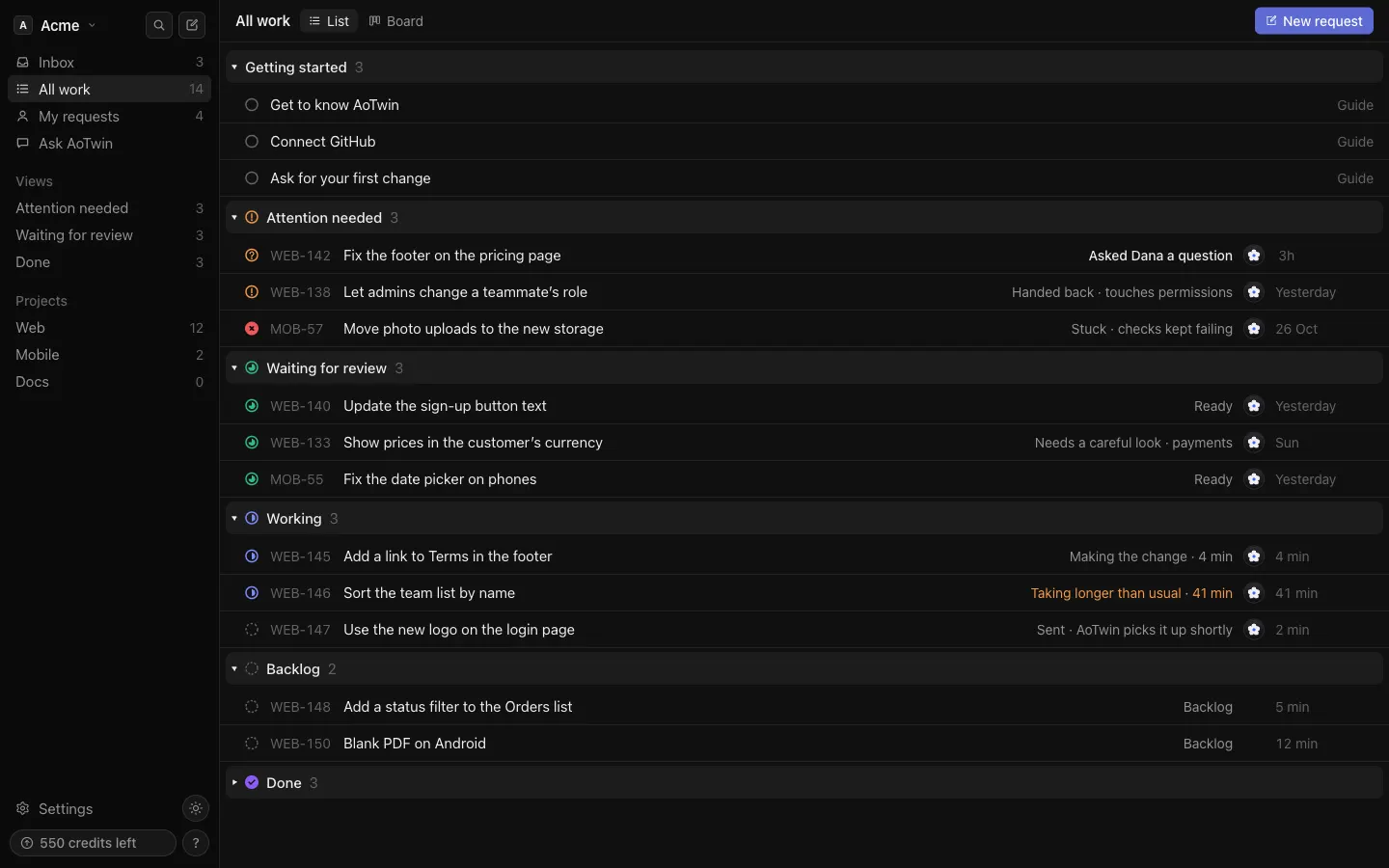
Overview
A status says where a ticket stands. Which statuses you see depends on who holds the ticket.
- A ticket held by a person, or by nobody, has a status that people set: Backlog, Todo, In progress, In review, Done or Canceled.
- A ticket assigned to AoTwin shows AoTwin’s own steps, like Working or Waiting for review. AoTwin moves these, not you.
On the board both kinds sit in the same six columns, so a mixed team sees one picture.
Tickets held by people
Set the status from the Status menu on the ticket page. The change saves at once. You can also drag the ticket on the board.
| Status | Meaning |
|---|---|
| Backlog | Nobody is on it yet. A ticket filed with no assignee starts here. |
| Todo | Waiting for whoever it is assigned to. A ticket filed with an assignee starts here. |
| In progress | The assignee is working on it. |
| In review | Waiting for a review by the team. |
| Done | Marked done by a person. |
| Canceled | Closed. The ticket leaves every list. |
Anyone in the workspace can change these statuses. Choosing Canceled is the exception: only the person who asked, or an admin, can cancel a ticket. It works exactly like Close request. See Tickets.
Assigning a ticket to a teammate does not change its status. Move it yourself when the work starts.
Tickets held by AoTwin
When you assign a ticket to AoTwin, the status menu is replaced by a plain label, because AoTwin sets the status while it holds the ticket. These are the steps.
| Status | Meaning |
|---|---|
| Sent | AoTwin has the ticket and starts shortly. |
| Working | AoTwin is making the change and running your team’s checks. Most changes take a few minutes. |
| Working · taking longer than usual | Half an hour passed without an update. AoTwin keeps going, and hands the ticket back if it gets stuck. |
| Waiting on you | AoTwin asked a question on the ticket. The ticket shows the question. |
| Handed back | AoTwin gave the ticket to a person, with the reason, instead of guessing. |
| Stuck | The team’s checks kept failing after a second try, so a person takes over. |
| Waiting for review | The change is ready and passed the checks. An engineer reviews it before it goes live. |
| Done | An engineer approved the change and merged it on GitHub. |
| Closed | Someone closed the ticket, so AoTwin stopped. |
AoTwin can’t approve or release anything. Only your engineers do.
When a ticket waits to start
A ticket in Sent can say why it hasn’t started. The ticket page tells you what to do, and AoTwin starts by itself once the cause clears.
- Saved · AoTwin starts once GitHub is connected: the project has no code yet. An admin connects GitHub in Settings > Connections.
- Waiting for capacity: AoTwin is busy and starts when it is free.
- Out of credits or Monthly limit reached: the workspace has no credits to spend. See Credits.
- Couldn’t reach Linear · retrying: the ticket is on its way to Linear. Nothing to do.
- AoTwin isn’t on the Free plan, or a note that a plan is needed: an admin picks a paid plan in Settings > Plan.
Answering a question
When the status is Waiting on you, write your answer in the comment box on the ticket. AoTwin picks the work back up as soon as someone answers. See Comments. The question also lands in the Inbox of the person it is for, and in their email.
What moves a ticket
| From | To | What does it |
|---|---|---|
| Any open ticket | Sent | Assigning it to AoTwin, or choosing Assign to AoTwin on a ticket nobody holds. |
| Sent | Working | AoTwin picks it up. |
| Working | Waiting on you | AoTwin has a question. |
| Waiting on you | Working | Someone answers in a comment. |
| Working | Waiting for review | The change is ready and passed the checks. |
| Working | Handed back or Stuck | AoTwin needs a person to decide, or the checks keep failing. |
| Waiting for review | Done | The pull request is merged on GitHub. |
| Waiting for review | Handed back | The pull request is closed without merging. |
| Any open ticket | Done or Closed | In a workspace connected to Linear, someone marks the issue done or canceled in Linear. AoTwin stops, and the ticket follows. |
Taking a ticket back from AoTwin
To take over, change Assigned to to a teammate or to Unassigned. AoTwin stops working, and the ticket shows a status people can set again, matching where it was: Working becomes In progress, Waiting for review becomes In review, and Sent becomes Todo. From then on you set the status yourself.
Who can cancel
Only the person who asked, or an admin, can cancel or close a ticket, whether a person or AoTwin holds it. A canceled ticket shows who closed it. Anyone can reopen it with Reopen.
FAQ
Why can't I change the status of this ticket?
AoTwin holds it. The app says “AoTwin moves this one. Assign it to a person first to set the status yourself.” Change Assigned to and the menu comes back. The only thing you can do while AoTwin holds a ticket is close it, if you asked for it or you are an admin.
What is the difference between Done and Closed?
Done means the work is finished. For AoTwin, that is a change an engineer merged. Closed and Canceled mean the work was stopped and is no longer needed.
Can AoTwin mark its own work Done?
No. A ticket AoTwin holds moves to Done when its pull request is merged on GitHub, or when someone marks the linked issue done in Linear.