> For agents: connect to the AoTwin MCP server at https://app.aotwin.io/mcp to read and change tickets and projects. Setup guide: https://aotwin.io/docs/mcp.md. Index of all docs: https://aotwin.io/llms.txt.
# Slack
Connect Slack so customer reports posted in a channel become tickets, and see how AoTwin handles each one.
## Overview
Connect the Slack channel where customers or colleagues report problems, and AoTwin files each report as a ticket. If a report is missing something important, AoTwin asks one or two short questions in the thread first. If the same problem is already filed, it points to the existing ticket. The reporter sees a short reply with the ticket. They never see your code.
Slack intake is available on paid plans. See [pricing](https://aotwin.io/pricing) for which plan includes it.
## Configure
> Only admins can add AoTwin to Slack and turn channels on.
### Add AoTwin to Slack
1. Open **Settings > Connections**.
2. Under **Chat**, find **Slack** and choose **Add to Slack**.
3. Approve the access in Slack.
On a workspace without a paid plan, the row says that Slack intake comes with a paid plan and links to the plan page. Add AoTwin to Slack before you try to manage channels.
### Turn channels on
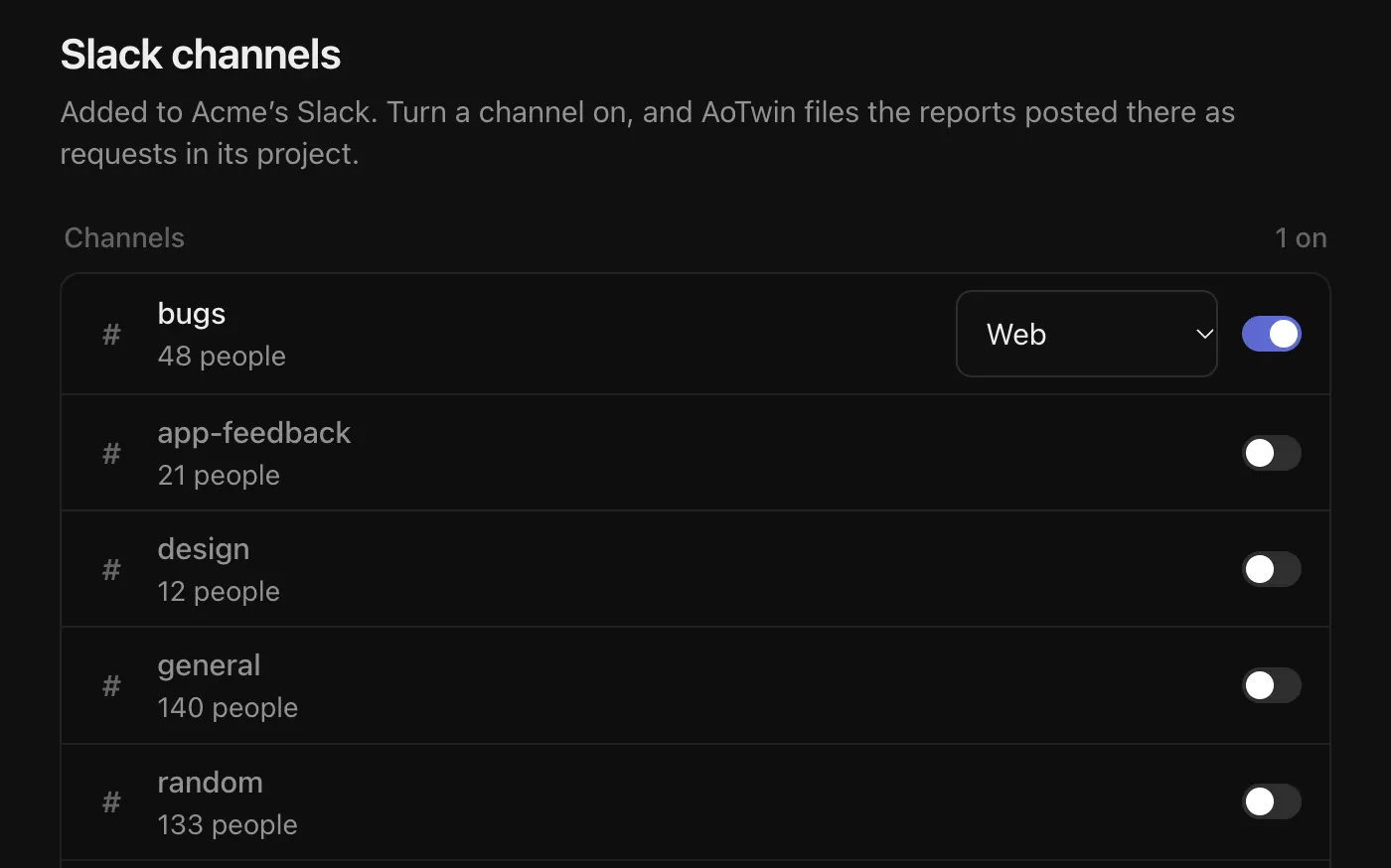
1. Open **Settings > Connections** and choose **Manage** next to Slack. This opens **Slack channels**.
2. Turn on each channel AoTwin should read. AoTwin joins the channel.
3. If you have more than one project, choose which project each channel files into.
Each channel files into a project, and projects come from the repositories AoTwin can work in. If the page says so, add a repository under **Settings > Code** first.
A private channel does not appear until you invite AoTwin: type `/invite @AoTwin` in the channel, then it shows up in the list. If AoTwin is not in a channel that is turned on, the row says **AoTwin isn't in this channel**.
One Slack channel files into one AoTwin workspace. If another workspace already reads the channel, AoTwin says so.
### Start right away
Under **Reports**, **Start right away** decides what happens after a report is filed.
- **On.** AoTwin starts on the ticket as soon as it is filed. This assigns the ticket to AoTwin and uses credits.
- **Off.** The report waits in AoTwin until someone on the team sends it to AoTwin.
## What happens to a report
1. Someone posts in a channel that is turned on. Mentioning AoTwin in a post makes sure it looks at the report.
2. AoTwin reads the thread. Greetings, thanks and chatter are ignored.
3. If the report is clear enough for an engineer to act on, AoTwin writes a ticket with a title, a description, acceptance criteria and a link to the thread. The reporter is matched to a team member by email when possible.
4. If something important is missing, AoTwin asks up to two short questions in the thread and waits for the answer. If the thread is still too thin after asking, AoTwin tells the reporter it could not create a ticket from the details so far and asks them to post again with what they were doing and what they expected.
5. If the report matches a ticket that already exists, AoTwin replies with that ticket instead of filing a second one.
The reply in Slack is short: **Thanks, ticket created** with the ticket key, or, when **Start right away** is off, that the ticket is filed and someone on the team can send it to AoTwin.
> Reading a report uses credits. When the workspace has none, reports wait and **Slack channels** shows how many are waiting. AoTwin reads them as soon as there are credits again. See [Credits](https://aotwin.io/docs/credits).
## Remove AoTwin from Slack
On **Slack channels**, choose **Remove** under **Remove AoTwin from Slack** and confirm. AoTwin stops reading every channel. Tickets it already filed stay.
If AoTwin loses access to Slack, the page says it cannot reach Slack and offers **Add AoTwin to Slack again**.
## FAQ
Which messages become tickets?
Reports of something wrong or wanted in the product: bugs, annoyances and wishes about a specific part of it. Questions about anything else, greetings and chatter do not.
Does the reporter see my code?
No. They see a short reply with the ticket key.
Can AoTwin start on a report without anyone looking at it?
Only if you turn on **Start right away**. Otherwise a person sends the ticket to AoTwin.