> For agents: connect to the AoTwin MCP server at https://app.aotwin.io/mcp to read and change tickets and projects. Setup guide: https://aotwin.io/docs/mcp.md. Index of all docs: https://aotwin.io/llms.txt.
# Review the work
Answer AoTwin's questions, read what it changed, and see how a ticket reaches Done or comes back.
## Overview
When AoTwin finishes a ticket, it does not ship anything. It opens a pull request in your repository and tells you what changed. An engineer on your team reviews the pull request and merges it, the same way they would for a colleague's work.
This page covers what you see along the way: questions from AoTwin, the pull request, hand-backs, and how a ticket reaches **Done**.
## Find out where a ticket stands
The ticket page always shows the current status and a line saying what comes next. [Statuses](https://aotwin.io/docs/statuses) lists every status. To find tickets that need you:
- **Inbox** (see [Inbox](https://aotwin.io/docs/inbox)) lists what changed on tickets you asked for or that wait on you, such as **AoTwin has a question for you**, **Ready for review** and **Handed back to you**.
- **Attention needed** lists tickets AoTwin cannot move until someone helps: a question, a hand-back or failing checks.
- **Waiting for review** lists finished changes that wait for an engineer.
- **Done** lists approved changes.
The person who asked also gets an email when AoTwin has a question, when the work is ready for review and when it is done.
## Answer a question
If a ticket is unclear and guessing would be wrong, AoTwin asks one short question and waits. The ticket shows **Waiting on you**, or **Waiting on** a name when the question is for someone else.
To answer, write a comment on the ticket. AoTwin reads your comment as the answer and picks the work back up. If the ticket comes from Linear, you can also reply to AoTwin there.
A comment on a ticket is read as an answer only while AoTwin is waiting on one. At any other time, it is an ordinary comment for your team.
## The pull request
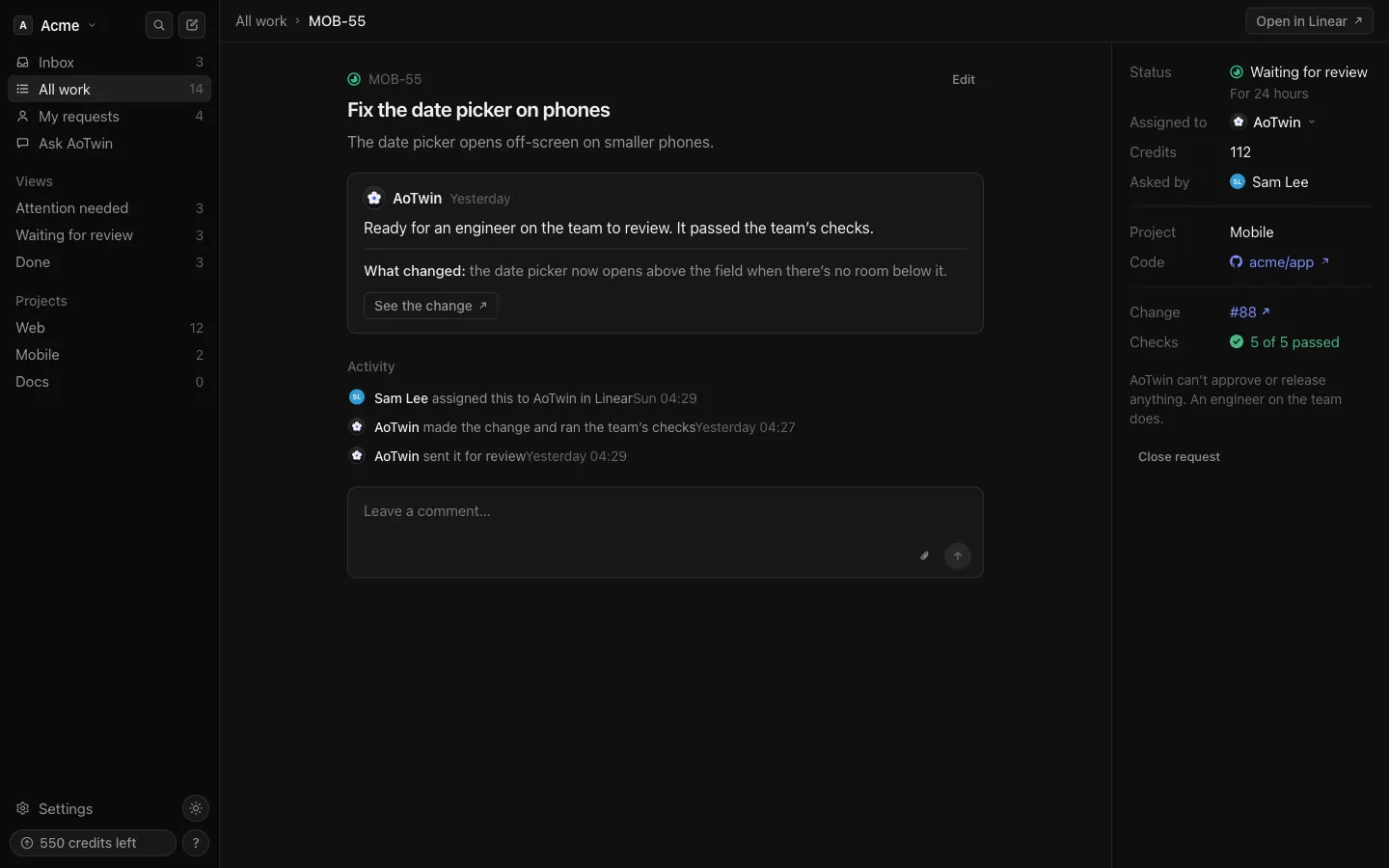
A finished ticket moves to **Waiting for review**. The ticket page shows:
- A plain-language line about what changed.
- **See the change**, a link to the pull request on GitHub.
- **Checks**, such as **3 of 3 passed**, for the checks you set under **Settings > Code**.
The pull request is on a branch named after the ticket, never on your default branch. Its description says what changed, links back to the ticket with **Closes** and the ticket key, and lists the checks that passed.
If some of the checks were already failing before AoTwin touched the code, the ticket says so, so you can tell old failures from new ones.
### Drafts and warnings
AoTwin opens the pull request as a draft, with a warning at the top, when part of the change needs a careful look. That covers anything touching sign-in, permissions, payments or personal data, and anything on iPhone or Android app screens. Treat a draft as a prompt to look harder before approving.
## How a ticket reaches Done
AoTwin cannot approve, merge or release anything. An engineer on your team does.
1. The engineer reviews the pull request on GitHub and merges it.
2. AoTwin sees the merge, and the ticket moves to **Done**. The ticket records who merged it. Done means approved; the change goes live with your team's next release.
If an engineer closes the pull request without merging it, the ticket moves to **Handed back** with the reason **Pull request closed without merging**.
## Hand-backs
A ticket comes back when AoTwin cannot, or should not, finish it. The ticket shows **Handed back** and the reason in one sentence. The person who asked is told in their Inbox, and on a Linear issue the issue goes back to the person who asked.
Common reasons:
- The description is too short for AoTwin to act on.
- The change needs infrastructure, database or dependency work.
- The change needs a path you protected under [Rules](https://aotwin.io/docs/rules), or a repository marked read-only.
- Someone else already has a pull request or branch open for the ticket.
- The ticket is for a project that has no code connected yet.
- The change needs more work than AoTwin puts into a single ticket. Split it into separate tickets, one change each.
A ticket shows **Stuck** when the checks kept failing after AoTwin tried again. It hands the ticket back so that nothing broken reaches review.
To carry on after a hand-back, give the ticket to a person. While AoTwin holds a ticket, its status is AoTwin's to set. To try AoTwin again, add what was missing to the ticket, assign it to a person, then assign it to AoTwin again.
> A hand-back costs half of what AoTwin used, up to a cap. If something goes wrong on AoTwin's side, it costs nothing. See [Credits](https://aotwin.io/docs/credits).
## Ask for changes
AoTwin does not take change requests as comments on a finished ticket. To change the result:
- Ask an engineer to adjust the pull request, as they would for any colleague's work.
- File a new ticket for the follow-up. On any comment, **New request from comment…** starts one with the comment text.
- Close the pull request without merging. The ticket is handed back, and you decide what happens next.
## FAQ
Who can merge AoTwin's pull request?
Anyone on your team who could merge a colleague's pull request. AoTwin has no way to merge, approve or release.
What does Done mean?
An engineer approved and merged the change. It goes live with your team's next release.
I closed the ticket after AoTwin opened a pull request. What happens to the pull request?
If the pull request is not merged yet, closing the ticket closes it too.
Why is a pull request a draft?
AoTwin opens a draft when part of the change needs a closer look, for example because it touches sign-in or payments, or changes an iPhone or Android screen. The ticket carries the same warning.