> For agents: connect to the AoTwin MCP server at https://app.aotwin.io/mcp to read and change tickets and projects. Setup guide: https://aotwin.io/docs/mcp.md. Index of all docs: https://aotwin.io/llms.txt.
# Inbox
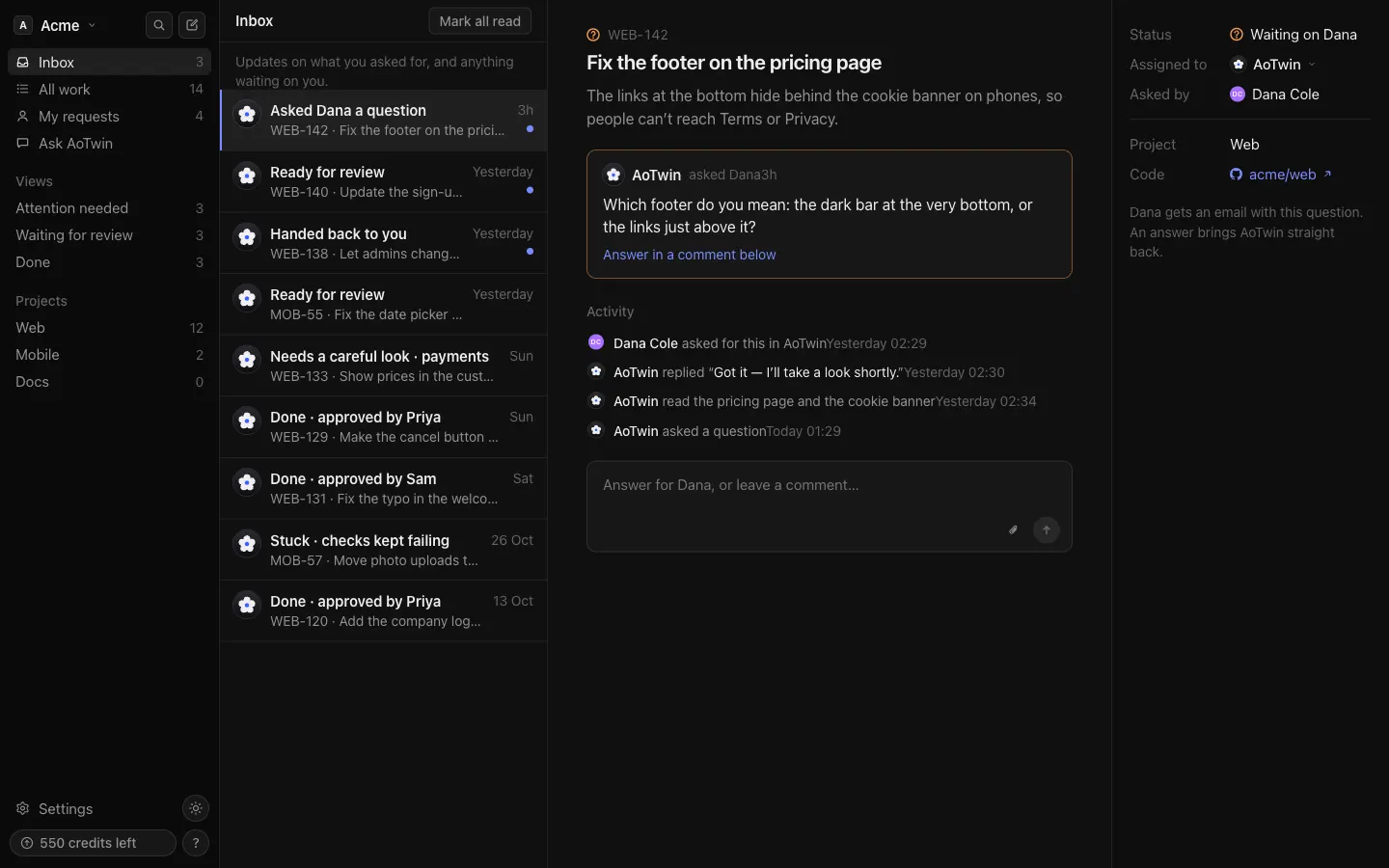
See what AoTwin has for you: questions, hand-backs and finished changes on tickets you asked for.
## Overview
Your **Inbox** is the list of things that happened to your tickets while you were away, and the things waiting on you. It is personal: each person sees their own.
Open it from the sidebar. A number beside **Inbox** counts the updates you haven't read.
## Basics
### What lands in it
An update arrives when AoTwin changes a ticket you asked for, or a ticket it is waiting on you for.
| Update | When it arrives |
| --- | --- |
| **AoTwin has a question for you** | AoTwin needs an answer before it can go on. |
| **Handed back to you** | AoTwin gave the ticket to a person instead of guessing. The reason shows on the ticket. |
| **Stuck** | The team's checks kept failing, so a person takes over. |
| **Ready for review** | The change is ready. |
| **Done** | The change is finished. The line says how, for example that it was merged. |
| **AoTwin picked it up** | AoTwin went back to work on a ticket that was waiting on a person. |
When AoTwin waits on someone other than the asker, both people get an update. The person it waits on sees the plain version. The asker sees who it is waiting on, like **AoTwin asked** that person **a question** or **Handed back to** that person.
Updates appear for AoTwin's work, not for ordinary comments from teammates. For those, look at the ticket's activity. See [Comments](https://aotwin.io/docs/comments).
Three of these also arrive by email: a question, a change ready for review, and a finished change.
### Read an update
Press an update to open its ticket in the pane next to the list. You can comment on the ticket from there, for example to answer a question. On a phone the ticket opens full screen, with an **Inbox** link at the top to go back.
Each update shows the ticket's key and title, how long ago it happened, and a dot when you haven't read it.
### Mark everything read
Press **Mark all read** at the top of the list. The button shows only when something is unread. The count in the sidebar goes to zero.
### Answer AoTwin
An update that says **AoTwin has a question for you** opens a ticket with **Waiting on you** at the top and the question in AoTwin's words. Type your answer in the comment box and send it. AoTwin picks the work up again straight away. See [Statuses](https://aotwin.io/docs/statuses).
## FAQ
Why is my inbox empty?
Nothing has happened yet on tickets you asked for. When AoTwin has a question or work for you to review, it shows up here.
Why did an update disappear?
Updates for a ticket that was closed no longer show. Updates are also limited to the most recent 100.
I want to see tickets I filed. Is that the inbox?
No. **My requests** in the sidebar lists the tickets you asked for. The inbox is the stream of updates on them. See [Board and list](https://aotwin.io/docs/board-and-list).